A complete website system for developers
Write plain HTML.
Flea builds the server.
A dependency-free website system for developers: one binary that installs in a line, builds your Ubuntu server, deploys over SSH and serves automatic HTTPS. Your clients edit the page.
Single binary · No Go, Node or Python · Apple Silicon macOS & x86-64 Linux
# install the CLI — no dependencies
$ curl -fsSL https://fleacms.com/install.sh | bash

# create a plain-HTML site
$ flea new my-site && cd my-site

# build the server over SSH
$ flea setup

# publish with automatic HTTPS
$ flea deploy
✔ deployed · Let's Encrypt HTTPS enabled- Installs in one line
- Builds the server for you
- On-page editing for your clients
THE WHOLE SYSTEM
Not just a CMS.
Flea runs the whole trip: the binary on your machine, the server it builds, the deploy, the certificates, and the editing your clients do later.
-
Builds your server
Point
flea setupat a blank Ubuntu box over SSH. Flea installs itself there and gets the host ready to serve. Nothing to install by hand. -
HTTPS, handled
Flea requests and renews Let's Encrypt certificates, redirects
www, and serves every site over TLS. -
Deploy over SSH
Publish a committed Git branch to your own server. One host can serve as many sites as you need.
-
No build step
Plain HTML and CSS with JSON content. No bundler, no database, no Node toolchain to keep alive.
-
A real dev server
Live reload, LAN testing, email previews and
flea statusfor local and remote checks. -
Backups & rollback
Download a complete backup, roll code back while keeping live content, and recover deliberately.
THE DEVELOPER'S SIDE
Your markup.
One attribute.
Add snip to any element. Flea moves the content into JSON,
connects it to the on-page editor, and leaves your classes, layout and
links untouched.
Repeatable lists use multisnip. Everything else stays
developer-managed JSON and plain files you keep in Git.
Need a blog? Flea 0.15.0 adds draft posts, rich text and cover photos, with a documented JSON format for agents. See Blog setup and availability.
Meet snips<section>
<h1 snip>A little greener.</h1>
<p snip>
Find your next little growing thing.
</p>
</section>
<article multisnip="team">
<h2 snip="name">Sam Rivera</h2>
<img snip="photo" src="/images/sam.jpg" alt="">
</article>AI-FRIENDLY
Agents can build it with you.
Every Flea site ships portable instructions a coding agent understands. Point Claude Code, Codex or another agent at the repo and it can follow your conventions, import an existing site and keep editable content intact.
- Skill files checked into Git beside your site
-
AGENTS.mdguidance in every project - No plugin, account or special runtime required
- Plain HTML out, so any agent can read it
$ import https://acme.com into this site

reading flea/skills/import-brochure/SKILL.md
fetching pages, images and styles
rebuilding layout with Prewind
marking headings, copy and media as snips
ready — run flea status, then commitTHE ADMIN'S SIDE
Their website.
Their words.
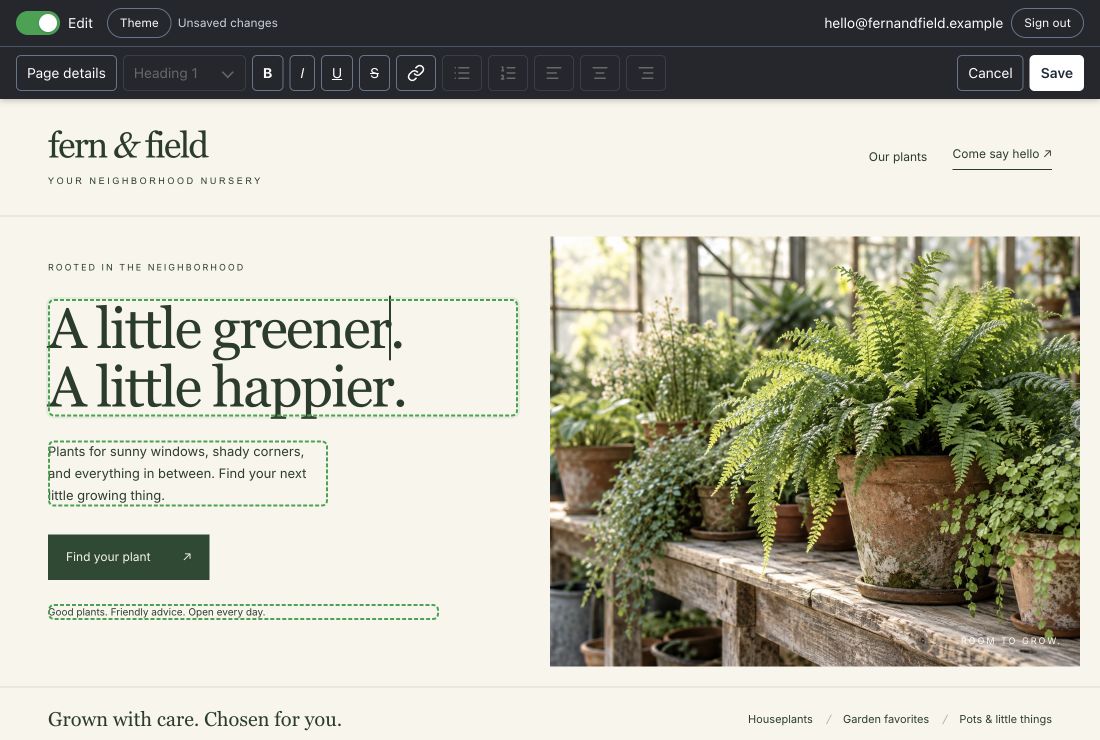
Admins sign in with an emailed code, click the text, photo or list they want to change, and save. Text, media and repeatable collections are editable on the page. You decide what they can touch.
- 1 Click
- 2 Edit
- 3 Save
START TO FINISH
Five commands to live.
Build locally. Let Flea prepare the server. Publish when you are ready.
-
01
Install the CLI
One line. No Go, Node or Python to install first.
curl -fsSL https://fleacms.com/install.sh | bash -
02
Start a site
A clean folder of HTML, CSS and JSON. Your design, no build step.
flea new my-site cd my-site -
03
Build locally
Live reload, editable content and validation while you work.
flea dev -
04
Prepare the server
Flea installs itself on a blank Ubuntu host over SSH.
flea setup -
05
Publish
Ship the branch and enable HTTPS. One host, many sites.
flea deploy
Try Flea 0.19.0
Apple Silicon Mac & x86-64 Linux · no dependencies
curl -fsSL https://fleacms.com/install.sh | bash
Bring your HTML.
Flea brings the server.
For developers who want to own the whole stack, and clients who just want to edit the page. One binary, your own server, and content you can back up and take with you.
Explore the docs0.19.0 is available to try. We’d like your feedback.